logo
Good price  online

products details

Created with Pixso. Home Created with Pixso. Products Created with Pixso.
SMT Machine Parts
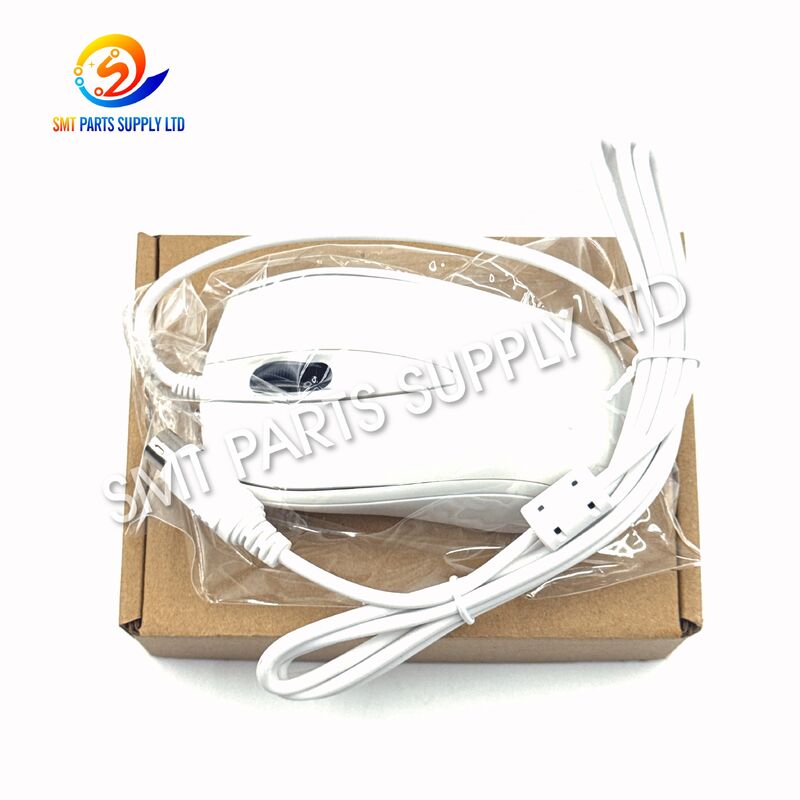
Created with Pixso. YAMAHA KW3-M5169-04 Mouse for YS12P YS12F YS24 SMT Mounter

YAMAHA KW3-M5169-04 Mouse for YS12P YS12F YS24 SMT Mounter

Brand Name: YAMAHA
Model Number: KW3-M5169-04
MOQ: 1 Piece
Price: Negotiable
Delivery Time: 3–7 Working Days
Payment Terms: T/T
Detail Information
Place of Origin:
CHINA&JAPEN
Brand:
YAMAHA
Part Number:
KW3-M5169-04
Part Name:
Mouse
Product Category:
SMT Machine Parts
Product Type:
Operator Input Accessory
Compatible Models:
YS12P, YS12F, YS24
Application:
SMT Pick And Place Mounter
Function:
Machine Interface Navigation And Operator Input
Replacement Reference:
Match KW3-M5169-04 And Existing Machine Configuration
Packaging Details:
CARTON
Supply Ability:
1000PCS/YEAR
Highlight:

YAMAHA KW3-M5169-04 SMT mounter mouse

,

YS12P YS12F compatible mouse

,

YS24 SMT machine replacement part

Product Description

YAMAHA KW3-M5169-04 Mouse for YS12P YS12F YS24 SMT Mounter

YAMAHA KW3-M5169-04 Mouse for YS12P YS12F YS24 SMT Mounter YAMAHA KW3-M5169-04 Mouse for YS12P YS12F YS24 SMT Mounter  YAMAHA KW3-M5169-04 Mouse for YS12P YS12F YS24 SMT Mounter

The YAMAHA KW3-M5169-04 Mouse is a machine-side operator input component used with compatible YAMAHA YS12P, YS12F and YS24 SMT mounters. It provides a practical control interface for technicians and operators who need to navigate machine menus, select functions, adjust production settings and perform maintenance-related operations through the mounter control system.

As an frequently used external operating accessory, a damaged or unreliable mouse can reduce operator efficiency even when the main placement machine remains mechanically functional. Replacing the correct part helps restore smooth interaction with the equipment and avoids unnecessary inconvenience during setup, troubleshooting and production changeovers.

For maintenance teams, SMT factories and spare-parts distributors, ordering by the exact KW3-M5169-04 part number provides a clearer way to identify the required component and reduce the risk of purchasing an unsuitable replacement.


Cause

Although an operator mouse is not part of the component placement mechanism itself, it is repeatedly used during machine operation. Long-term factory use can gradually cause problems that interfere with normal control.

Common Situation Possible Effect
Repeated daily operation Buttons or movement response may become unreliable
Cable or connector wear Intermittent communication with the machine
Accidental impact Physical damage to the mouse housing or internal components
Dust and production environment Reduced operating reliability over time
Incorrect replacement Poor compatibility or unstable operation
Aging machine accessories Increased need for maintenance spare parts

A defective operator input device may create relatively small symptoms but cause significant inconvenience to production personnel.

For example, operators may experience difficulty selecting menu items, accessing machine functions or completing setup procedures efficiently. During model changeovers or troubleshooting, even a simple interface problem can increase unnecessary machine waiting time.

For this reason, maintaining the correct operator peripherals as spare parts is a practical part of SMT equipment maintenance.


Solution

The KW3-M5169-04 YAMAHA Mouse provides a direct replacement option for machines using this specified part number.

When a machine mouse becomes damaged, unstable or difficult to operate, maintenance personnel should first confirm the existing part number and machine model. If the original component is marked KW3-M5169-04, selecting the same reference helps simplify replacement identification.

Why Use the Correct Part Number?
Requirement Benefit
Match KW3-M5169-04 Reduces incorrect ordering risk
Confirm machine model Improves application accuracy
Compare existing connector Helps verify physical compatibility
Check old part label Provides reliable replacement reference
Send machine information Enables faster supplier confirmation

Unlike a general office computer mouse, an SMT machine replacement part should be selected according to the machine configuration and installed component rather than appearance alone.

For international buyers, providing a clear photo of the original mouse, its label and machine model is recommended before shipment when there is any uncertainty.


Specifications
Item Specification
Brand YAMAHA
Part Number KW3-M5169-04
Standard Part Name MOUSE
Product Type SMT Mounter Operator Input Accessory
Compatible Machine YAMAHA YS12P
Compatible Machine YAMAHA YS12F
Compatible Machine YAMAHA YS24
Application SMT Pick and Place Machine
Main Function Operator Interface Navigation and Control
Installation Position Machine Operator Control Area
Replacement Method Match Existing Part Number and Machine Configuration
Industry SMT / Electronics Manufacturing

The KW3-M5169-04 reference is listed as a mouse in YAMAHA YS-series maintenance-part information, including YS12P/YS12F and YS24 documentation.


Application

The YAMAHA KW3-M5169-04 Mouse is primarily intended for the operator interface of compatible YAMAHA SMT placement equipment.

Typical Machine Applications
Machine Application
YAMAHA YS12P Operator control and interface navigation
YAMAHA YS12F Machine operation and setting access
YAMAHA YS24 Operator interface input
SMT Production Line Machine setup and production support
Maintenance Station Troubleshooting and service operation
Typical Operating Tasks

The mouse may be used during normal machine-interface operations such as:

  • Navigating machine software menus.
  • Selecting operating functions.
  • Accessing machine settings.
  • Supporting production program setup.
  • Assisting during product changeovers.
  • Opening maintenance or diagnostic screens.
  • Selecting parameters during machine adjustment.
  • Supporting technicians during troubleshooting procedures.

Its role is therefore focused on human-machine interaction, rather than directly controlling component pickup, placement accuracy or feeder operation.

This distinction is important when creating spare-parts inventories. The KW3-M5169-04 should normally be managed as an SMT machine control accessory or SMT spare part, rather than as a feeder, nozzle, motor or motion-control component.


How It Works

The operator mouse functions as an input device within the machine's control environment.

When the operator moves or activates the mouse, the input is transmitted to the compatible machine control system. The operator can then interact with graphical menus and functions displayed on the machine interface.

Basic Working Process

1. Operator Input

The technician or production operator uses the mouse to select a command or interface item.

2. Input Transmission

The mouse sends the corresponding operating input to the machine control system.

3. Interface Response

The machine software recognizes the selection and displays the appropriate menu, setting or command.

4. Operator Confirmation

The operator can continue with setup, adjustment, programming or maintenance work.

The component does not perform the placement process itself. Instead, it provides an important interface between the operator and the machine software.

For a high-mix SMT production environment, reliable access to machine controls can be especially important because operators frequently need to switch products, verify settings and perform machine adjustments.


YAMAHA KW3-M5169-04 Mouse for YS12P YS12F YS24 SMT MounterYAMAHA KW3-M5169-04 Mouse for YS12P YS12F YS24 SMT Mounter
Why This Part Matters in SMT Production

An SMT line contains many high-value mechanical and electronic components, so operator peripherals may appear relatively minor. However, maintenance efficiency depends on the complete machine being usable.

A malfunctioning mouse can complicate routine operations such as:

Production Activity Importance of Reliable Input
Program selection Enables efficient job preparation
Parameter adjustment Supports machine setup
Product changeover Helps operators navigate required menus
Alarm inspection Supports troubleshooting
Maintenance Allows access to service-related screens
Production preparation Improves operator workflow

Keeping commonly used control accessories available in spare-parts inventory can therefore reduce unnecessary delays.


How To Choose

Correct identification should be the first priority when purchasing YAMAHA SMT machine parts.

Step 1: Check the Part Number

Inspect the existing machine component or maintenance record.

The required reference for this product is:

KW3-M5169-04

Do not purchase based only on the general description "YAMAHA Mouse", because similar-looking parts may have different revisions or references.

Step 2: Confirm the Machine Model

This product is associated with:

  • YAMAHA YS12P
  • YAMAHA YS12F
  • YAMAHA YS24

If your machine is another YAMAHA model, provide its full model information before ordering.

Step 3: Compare the Existing Part

For older machines or equipment that has previously been repaired, the installed part may have been replaced or modified.

Before purchasing, compare:

Check Point Recommendation
Part number Must be checked first
Machine model Provide full model
Existing label Send a clear photograph
Connector Compare with current component
Physical appearance Use only as secondary verification
Machine configuration Confirm if uncertain
Step 4: Avoid Selecting Only by Appearance

Many industrial machine accessories can look similar externally. Matching appearance alone does not prove compatibility.

The part number and machine configuration should have priority.

Step 5: Send Information Before Ordering

For fast quotation and confirmation, buyers can provide:

Brand: YAMAHA
Part Number: KW3-M5169-04
Machine: YS12P / YS12F / YS24
Quantity: Required quantity
Photo: Existing part photo if available

Providing these details helps shorten the quotation process and reduces unnecessary communication.


Replacement and Maintenance Recommendations

Before replacing the mouse, the machine should be placed in an appropriate maintenance condition according to the factory's operating procedures.

Maintenance personnel should inspect the existing component and surrounding connection before concluding that replacement is necessary.

If the mouse response is abnormal, possible checks can include:

Inspection Purpose
Check physical condition Identify visible damage
Check connection Eliminate loose connection issues
Inspect cable condition Identify wear or damage
Verify machine response Confirm the symptom
Compare with known working part Help isolate the fault
Check part number Ensure correct replacement selection

Replacement should be performed by personnel familiar with the equipment and factory maintenance procedures.


Suitable Buyers

The KW3-M5169-04 is suitable for a range of professional SMT users.

SMT Factories

Factories operating YAMAHA YS-series mounters can keep the mouse as part of their maintenance inventory.

Equipment Maintenance Teams

Maintenance engineers may require the correct input accessory when restoring older production equipment.

SMT Spare Parts Distributors

Distributors supplying YAMAHA mounter parts can use the exact KW3-M5169-04 reference to respond to customer inquiries more efficiently.

Used Equipment Service Companies

Companies repairing or refurbishing YAMAHA SMT equipment may require operator peripherals when preparing machines for resale or production reuse.


Ordering Information

To receive an accurate quotation, please include as much information as possible in your inquiry.

Information Required Example
Brand YAMAHA
Part Number KW3-M5169-04
Product Mouse
Machine Model YS12P / YS12F / YS24
Quantity 1 pc, 2 pcs, 5 pcs, etc.
Existing Part Photo Recommended
Destination Country or region

For customers sourcing multiple SMT machine parts, a complete BOM or spare-parts list can also be submitted for combined quotation.

This approach is especially useful for maintenance projects involving several YAMAHA machine components at the same time.


FAQ
Q1: What machines use the YAMAHA KW3-M5169-04 Mouse?

The KW3-M5169-04 is associated with YAMAHA YS-series SMT mounters including YS12P, YS12F and YS24. Buyers should still verify the existing part number and machine configuration before ordering.

Q2: What is the main function of KW3-M5169-04?

It is an operator input device used for interaction with the SMT mounter control interface, supporting menu navigation, function selection, production setup, machine adjustment and maintenance-related operations.

Q3: Can I order it only by machine model?

Providing the machine model is useful, but the safest approach is to confirm KW3-M5169-04 on the existing part or maintenance documentation. A photo of the original component is also recommended.

Q4: Is this a feeder or motion-control component?

No. KW3-M5169-04 is classified as a mouse/operator input accessory for the machine control interface. It is not an SMT feeder, nozzle, servo driver, motor or conveyor component.

Q5: What information should I provide for quotation?

Please provide KW3-M5169-04, machine model, required quantity and destination. If available, send clear photos of the existing mouse and its identification label for faster compatibility checking.


Contact Us

Looking for YAMAHA KW3-M5169-04 Mouse or other YAMAHA SMT mounter spare parts?

Send us your part number, machine model, quantity and product photo. We can help confirm the requested item and prepare a quotation for your SMT maintenance or replacement requirements.

Inquiry Example:
YAMAHA KW3-M5169-04 Mouse
Machine: YS12P / YS12F / YS24
Quantity: ___ pcs
Destination: ___

Bulk spare-parts lists and multiple-part inquiries are welcome.