| Brand Name: | DEK |
| Model Number: | 129924 129925 133585 133586 129927 |
| MOQ: | 1PCS |
| Price: | Negotiable |
| Delivery Time: | 1-2 DAYS |
| Payment Terms: | T/T,Western Union |
![]()
![]()
![]()
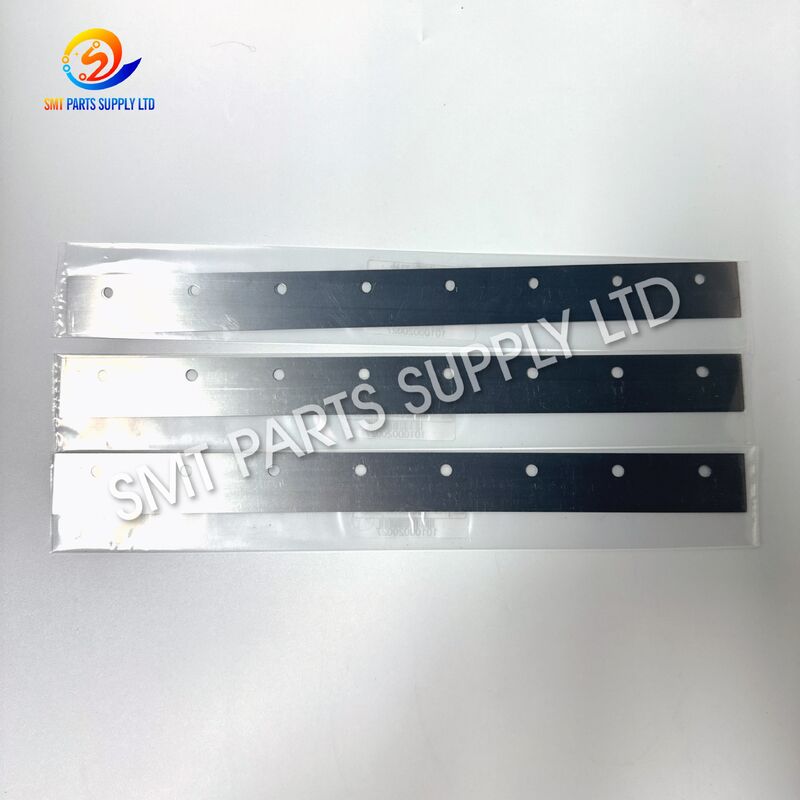
DEK printer squeegee blades are key consumable parts used in SMT stencil printing machines. They are installed on the squeegee holder to push solder paste across the stencil surface and transfer paste accurately onto PCB pads. This product range includes 170mm, 200mm, 300mm, 400mm and 440mm blade sizes, with part numbers 129924, 129925, 133585, 133586 and 129927. These blades are suitable for DEK printer applications where stable printing pressure, clean paste rolling and consistent solder paste deposition are required. A good squeegee blade helps reduce insufficient solder, bridging, paste residue and unstable printing quality. For SMT factories, EMS companies, PCB assembly lines and maintenance teams, choosing the correct squeegee blade size and part number is important for improving production yield and reducing downtime.
In SMT production, solder paste printing is one of the most important processes before component placement and reflow soldering. Many common soldering defects start from the printing stage. If the squeegee blade is worn, damaged, deformed or not matched with the stencil size, the solder paste may not be transferred evenly. This can cause poor solder joints, short circuits, insufficient solder volume, solder beads and unstable printing repeatability.
A squeegee blade works under continuous friction, pressure and movement. During daily production, the blade edge directly contacts the stencil surface. After long-term use, the edge may become rounded, scratched or uneven. Once the blade edge loses its straightness and elasticity, solder paste rolling will become unstable. The operator may need to increase pressure to compensate, but excessive pressure can damage the stencil, reduce blade life and create more printing problems.
For DEK stencil printers, blade length and installation accuracy are also important. If the blade is too short, it may not cover the printing area completely. If it is too long, it may affect paste control and machine movement. Therefore, selecting the correct blade size such as 170mm, 200mm, 300mm, 400mm or 440mm helps achieve better stencil contact and stable paste transfer.
Common causes of squeegee blade replacement include daily wear, incorrect cleaning, wrong pressure setting, poor paste rolling, visible blade damage and repeated printing defects. For high-volume SMT production, preventive replacement is often more cost-effective than waiting until defects appear. A small blade problem may lead to large batch quality issues, rework costs and delivery delays.
| Problem | Possible Cause | Effect on Production |
|---|---|---|
| Insufficient solder paste | Worn blade edge or low pressure | Weak solder joints and open circuits |
| Solder bridging | Excess paste or poor blade contact | Short circuit risk after reflow |
| Paste residue on stencil | Damaged or uneven blade | Poor cleaning and unstable printing |
| Uneven paste volume | Incorrect blade length or pressure | Inconsistent component soldering |
| Stencil scratches | Excessive pressure or rough blade edge | Reduced stencil life |
| Poor paste rolling | Blade angle or blade wear issue | Unstable printing repeatability |
| Frequent manual adjustment | Wrong specification or aging blade | Longer setup time and downtime |
Using the correct DEK printer squeegee blade helps keep the solder paste printing process stable and repeatable. Our DEK squeegee blades are supplied in commonly used sizes including 170mm, 200mm, 300mm, 400mm and 440mm. They are suitable for different stencil widths, PCB sizes and production requirements. The available part numbers include 129924, 129925, 133585, 133586 and 129927, making it easier for maintenance engineers and purchasing teams to match the right replacement part.
A good squeegee blade should have a clean and straight working edge. It should provide stable contact with the stencil surface without excessive pressure. When the blade moves across the stencil, it should help the solder paste roll smoothly in front of the blade. Stable paste rolling allows the stencil apertures to be filled evenly, which improves solder paste transfer and reduces printing defects.
For SMT factories, replacing blades regularly is a practical way to maintain printing quality. Compared with expensive machine downtime, PCB rework or quality claims, squeegee blades are low-cost consumable parts. Keeping spare blades in stock can help production lines respond quickly when printing quality changes. It is especially important for factories running multiple DEK printers, high-mix production or urgent customer orders.
Our supply service supports both regular replacement demand and urgent spare parts requirements. We can help customers check blade length, part number, machine application and order quantity before shipment. For customers who are not sure which blade to choose, we can provide reference matching based on the old blade size, current DEK printer model and production application.
| Benefit | Description |
| Stable paste transfer | Helps solder paste fill stencil apertures evenly |
| Better printing repeatability | Supports consistent results across production batches |
| Reduced printing defects | Helps reduce bridging, insufficient paste and residue |
| Easy replacement | Suitable for regular maintenance and quick line recovery |
| Multiple sizes available | Covers 170mm, 200mm, 300mm, 400mm and 440mm needs |
| Part number matching | Includes 129924, 129925, 133585, 133586 and 129927 |
| Suitable for SMT lines | Used for PCB assembly, EMS production and printer maintenance |
| Item | Description |
| Product Name | DEK Printer Squeegee Blades |
| Application | SMT solder paste stencil printing |
| Compatible Machine | DEK printer |
| Available Sizes | 170mm, 200mm, 300mm, 400mm, 440mm |
| Part Numbers | 129924, 129925, 133585, 133586, 129927 |
| Product Type | SMT printer consumable spare part |
| Function | Push solder paste across stencil surface |
| Use Position | Squeegee holder / printing head area |
| Condition | New replacement part |
| Suitable Industry | SMT production, EMS factory, PCB assembly |
| Supply Type | Standard stock and batch supply available |
| Packing | Protective packing for safe shipment |
| MOQ | 1 piece or according to customer demand |
| Quality Control | Size check and visual inspection before delivery |
| Blade Size | Reference Part Number | Main Use |
| 170mm | 129924 | Small PCB or narrow printing area |
| 200mm | 129925 | Medium-small SMT stencil printing |
| 300mm | 133585 | Standard PCB production application |
| 400mm | 133586 | Larger stencil printing application |
| 440mm | 129927 | Wide printing area and larger boards |
| Performance Point | What It Means | Why It Matters |
| Edge straightness | Blade edge should remain even | Supports uniform solder paste transfer |
| Blade length | Must match printing area | Prevents incomplete coverage |
| Contact stability | Blade contacts stencil evenly | Reduces printing variation |
| Paste rolling | Paste should roll smoothly | Improves aperture filling |
| Replacement timing | Replace before severe wear | Prevents batch defects |
| Installation accuracy | Blade should be fixed correctly | Keeps printing pressure balanced |
![]()
DEK printer squeegee blades are widely used in SMT solder paste printing lines. They are suitable for electronics manufacturing factories, PCB assembly workshops, EMS production companies, SMT machine repair companies and spare parts distributors. In the SMT process, the stencil printer is located before the pick-and-place machine. If the printing process is unstable, even a high-speed placement machine and a precise reflow oven cannot fully correct the soldering result. Therefore, squeegee blade quality directly affects the first step of SMT production quality.
These blades can be used for regular machine maintenance, spare parts replacement, production line setup, trial production, batch production and urgent repair. Different lengths are selected according to stencil width, PCB size and production process. For example, a small board may require a shorter blade, while a larger PCB or wide stencil may require a 400mm or 440mm blade. Correct selection helps reduce solder paste waste and improves the consistency of printing pressure.
For factories producing consumer electronics, automotive electronics, industrial control boards, LED boards, communication equipment, power modules or medical electronics, stable solder paste printing is very important. A worn blade may create invisible quality risks. Some defects may not be found immediately after printing but appear after reflow or final testing. This may increase rework cost, delay delivery and affect customer satisfaction.
| Application Area | Typical Use |
| SMT production line | Daily solder paste printing |
| EMS factory | Multi-model PCB assembly |
| Printer maintenance | Replacement of worn blades |
| PCB assembly workshop | Stable paste deposition |
| SMT spare parts supply | Inventory for DEK printer users |
| Trial production | Process setup and printing test |
| High-volume production | Preventive maintenance and line stability |
| Production Type | Blade Requirement |
| Small batch production | Flexible size selection |
| High-mix production | Quick blade replacement and stable quality |
| Mass production | Reliable printing repeatability |
| Fine-pitch components | Clean and stable paste transfer |
| Large PCB production | Longer blade size such as 400mm or 440mm |
| Maintenance stock | Multiple part numbers ready for replacement |
The squeegee blade is mounted on the DEK printer squeegee holder. During the printing process, solder paste is placed on the stencil. The printer drives the blade across the stencil at a controlled speed, angle and pressure. As the blade moves, it pushes solder paste forward and forces the paste into stencil apertures. When the PCB is positioned under the stencil, solder paste is transferred to the PCB pads through the apertures.
The blade must maintain stable contact with the stencil surface. If contact is too light, solder paste may not fully fill the apertures. If pressure is too high, paste may smear, the stencil may wear faster and the blade edge may be damaged. A suitable blade helps maintain the correct balance between paste movement, stencil contact and printing pressure.
A clean blade edge supports smooth solder paste rolling. Paste rolling is important because solder paste should not simply slide or be dragged across the stencil. It should roll in front of the blade, allowing consistent filling of the stencil apertures. If the blade edge is damaged, paste rolling may become unstable. This can create different paste volumes between boards or even between pads on the same board.
The blade length also affects the process. The blade should cover the printing area completely, with enough margin for paste control. If the selected blade length does not match the stencil and PCB size, the printing result may be affected. That is why sizes such as 170mm, 200mm, 300mm, 400mm and 440mm are commonly prepared for different printing needs.
| Step | Process | Key Point |
| 1 | Blade installed on holder | Confirm correct size and position |
| 2 | Solder paste placed on stencil | Use suitable paste volume |
| 3 | Printer lowers blade | Set proper pressure and angle |
| 4 | Blade moves across stencil | Paste rolls and fills apertures |
| 5 | PCB receives paste | Paste deposits onto PCB pads |
| 6 | Inspection after printing | Check paste volume and shape |
| 7 | Production continues | Replace blade when wear appears |
| Factor | Recommended Control |
| Blade condition | Replace if edge is worn, bent or scratched |
| Blade pressure | Avoid too high or too low pressure |
| Blade angle | Follow machine process setting |
| Stencil condition | Keep stencil clean and flat |
| Solder paste condition | Use suitable paste viscosity and storage method |
| Printing speed | Match process requirement |
| Cleaning cycle | Clean blade and stencil regularly |
Choosing the right DEK printer squeegee blade should start from the current machine and production application. The most direct method is to check the old blade part number and blade length. If the old blade is marked with 129924, 129925, 133585, 133586 or 129927, you can use the same part number for replacement. If the mark is not clear, measure the blade length and compare it with the available sizes: 170mm, 200mm, 300mm, 400mm and 440mm.
The second point is to check the PCB size and stencil printing area. The blade should be long enough to cover the required printing width. However, choosing a blade that is too long for a small board is not always the best option. It may increase paste waste and make paste control less efficient. Therefore, the selected blade length should match the stencil and production process.
The third point is production requirement. For fine-pitch components, BGA, QFN, LED boards or products with strict solder paste volume control, blade condition is very important. A new and clean blade can help improve printing stability. For general production, regular blade replacement also helps reduce quality fluctuation.
The fourth point is stock planning. SMT factories often keep common printer consumables in stock. Squeegee blades are low-cost but important parts. When printing quality becomes unstable, having spare blades available can shorten troubleshooting time. For customers using multiple DEK printers, it is recommended to keep several sizes and part numbers in inventory.
| Selection Factor | Recommendation |
| Old blade part number | Use the same part number for direct replacement |
| Blade length | Choose 170mm, 200mm, 300mm, 400mm or 440mm according to printing area |
| PCB size | Shorter blade for small PCB, longer blade for wide stencil |
| Printing quality requirement | Use new blade for fine-pitch and high-precision printing |
| Production volume | Keep spare stock for continuous production |
| Maintenance cycle | Replace regularly before severe wear |
| Supplier support | Confirm size and part number before order |
| Information Needed | Example |
| Machine brand | DEK printer |
| Required size | 170mm / 200mm / 300mm / 400mm / 440mm |
| Part number | 129924 / 129925 / 133585 / 133586 / 129927 |
| Quantity | 1 piece, 5 pieces, 10 pieces or batch order |
| Application | SMT solder paste printing |
| Delivery requirement | Standard shipment or urgent order |
| Existing sample photo | Helpful for confirmation |
Q1: What sizes are available for these DEK printer squeegee blades?
A1: The available sizes include 170mm, 200mm, 300mm, 400mm and 440mm. Customers can choose the correct size according to the stencil width, PCB size and current DEK printer application.
Q2: Which part numbers can you supply for this product?
A2: We can supply DEK printer squeegee blade part numbers 129924, 129925, 133585, 133586 and 129927. Please send the required part number or blade size before ordering.
Q3: Why should squeegee blades be replaced regularly?
A3: A worn blade edge may cause uneven solder paste transfer, bridging, insufficient paste, stencil residue and unstable printing quality. Regular replacement helps maintain stable SMT production and reduce rework cost.
Q4: How can I choose the correct blade for my machine?
A4: Please check the old blade part number, blade length, DEK printer model and stencil printing width. If you are not sure, send us photos or measurements for confirmation.
Q5: Can these blades be used for SMT production line maintenance?
A5: Yes. These blades are suitable for DEK printer maintenance, spare parts replacement, SMT production line setup and daily solder paste printing. They are commonly used by EMS and PCB assembly factories.
If you need DEK printer squeegee blades 170mm, 200mm, 300mm, 400mm or 440mm, please contact us with the required part number and quantity. We can help confirm the correct model before shipment and provide suitable SMT printer spare parts support for your production line.
For faster quotation, please send the following details:
| Required Information | Details |
| Product name | DEK Printer Squeegee Blades |
| Part number | 129924, 129925, 133585, 133586, 129927 |
| Size | 170mm, 200mm, 300mm, 400mm, 440mm |
| Quantity | Please provide order quantity |
| Machine model | DEK printer model if available |
| Delivery address | Country and city |
| Urgency | Normal order or urgent replacement |
We are ready to support SMT factories, EMS companies, equipment maintenance teams and spare parts distributors with reliable DEK printer consumables and SMT machine spare parts.